Kindle Paperwhite 16GB Tested: Is Amazon’s 7-Inch E-Reader Worth It?
The Kindle Paperwhite 16GB is made for readers who want a distraction-free screen, a larger page, adjustable warm light, weeks of battery life, and enough storage for a serious digital library. We inspected its display, reading comfort, waterproof design, storage, lighting, performance, and practical limitations to answer a simple question: is this the Kindle that makes sense for most everyday readers?
A good e-reader should disappear into the background. You open it, find your book, and start reading—not admire a notification panel, fight glare, or discover that your battery needs attention halfway through a chapter. The Paperwhite’s pitch is wonderfully simple: a paper-like reading experience with a few modern comforts. 📚☕
Quick Inspection Summary
| Best for | Daily readers, commuters, travelers, bedtime readers, and anyone who wants books without phone distractions. |
|---|---|
| Display | 7-inch glare-free E Ink display with 300 ppi resolution and adjustable front lighting. |
| Storage | 16GB of internal storage for a large e-book library and supported digital content. |
| Battery claim | Weeks of battery life, with the exact result depending on reading time, brightness, wireless use, and other settings. |
| Durability | Water-resistant design intended for accidental splashes and immersion within Amazon’s stated limits. |
| Main limitation | E Ink is excellent for reading but not designed to behave like a fast color tablet or a general-purpose app device. |
| What we like 👍 | What to consider 🤔 |
|---|---|
| Large 7-inch glare-free E Ink screen with crisp 300 ppi text. | Black-and-white E Ink is not intended for fast video, gaming, or colorful apps. |
| Adjustable front light and warm light tone for evening reading. | Warm-light comfort is personal and does not replace good sleep habits. |
| 16GB storage for a substantial book collection. | Storage is not user-expandable through a memory-card slot. |
| Water-resistant design for reading near a pool or in the bath with sensible care. | Water resistance has limits and should not be treated as permission for careless immersion. |
| Long battery life measured in weeks rather than hours. | Actual battery life changes with brightness, Wi-Fi, Bluetooth, and reading habits. |
| Lightweight design for travel and long reading sessions. | It is a dedicated reading device, not a full tablet replacement. |
For more practical electronics and personal-tech guides, explore the Portable Audio section or visit the Inspects homepage for our latest inspections.
The 7-Inch E Ink Display
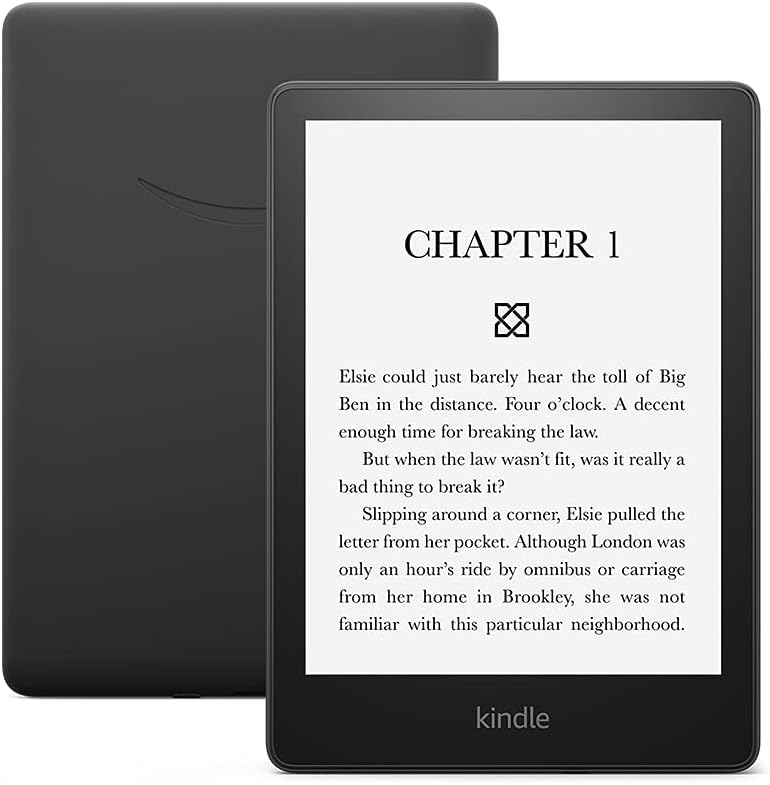
The Kindle Paperwhite uses a 7-inch glare-free E Ink display with 300 pixels per inch. That combination is important because text clarity is one of the main reasons to choose a dedicated e-reader over a phone. Letters remain sharp, the screen is designed to be readable in bright conditions, and the display does not behave like a glossy tablet panel reflecting every lamp in the room.
The larger screen gives books a more relaxed page layout than a small six-inch reader. You can increase font size without making every page feel like a single sentence, which is helpful for readers who prefer larger text or wider spacing. The difference is subtle at first, then suddenly obvious when you return to a smaller display.
E Ink has a distinct visual character. It is calm, low-distraction, and comfortable for long-form reading, but it is not meant to scroll like a smartphone. Page turns can include a brief refresh, and heavy web pages or animated content will never feel as fluid as they do on a tablet. That is not a flaw; it is the trade-off that keeps the Paperwhite focused on books.

Warm Light and Night Reading
The Paperwhite includes a built-in front light with adjustable brightness and a warm light tone. The brightness control helps you read in different rooms, while the warm adjustment shifts the screen toward a softer amber appearance for evening sessions.
This is one of the most useful upgrades over a basic e-reader because reading habits are not limited to sunny afternoons. A bright white light may feel fine during the day, while a warmer tone can feel gentler at night. The ideal setting depends on the room, your eyes, and personal preference, so there is no single “correct” warmth level.
The front light is not the same as staring at a bright phone screen. Still, good sleep habits involve more than one setting, and readers should not treat warm light as a medical promise. Lower the brightness when practical, keep the screen comfortable, and give your eyes regular breaks during long sessions.
For bedtime readers, the most valuable feature may be the absence of notifications. Your phone can remain across the room while the Paperwhite handles the one job you actually wanted: letting you read one more chapter that somehow becomes three. 🌙
Page Turns and Everyday Performance
Amazon positions this generation as offering faster page turns than the previous Paperwhite generation. Faster navigation matters because an e-reader should feel responsive when you open a book, change a font, search a title, or move through menus.
Performance should still be judged by e-reader standards rather than smartphone standards. The Paperwhite is optimized for reading and library management, not for rapidly switching between demanding apps. Within its intended use, a responsive interface makes the device feel less like a slow digital book and more like a polished reading tool.
Page-turn speed can vary depending on the book, refresh settings, illustrations, file complexity, and software version. A simple novel will generally feel different from a heavily formatted document or graphic-heavy book. The key point is that the device is built to make ordinary reading smooth without turning the screen into a battery-hungry tablet.

Is 16GB Enough?
For most readers, 16GB is generous. E-books are usually small, so a 16GB Paperwhite can hold a substantial library of novels, essays, magazines, and other supported content. The exact number depends on file size and the type of content you store.
Storage becomes more important if you use audiobooks, illustrated books, comics, or large documents. Those files can consume space more quickly than ordinary text novels. If your library is mostly standard e-books, 16GB should provide comfortable room without requiring constant housekeeping.
Cloud synchronization also reduces the pressure to keep every title downloaded forever. You can manage your library and download the book you want when you need it, subject to account access and an internet connection. Readers who frequently travel offline may prefer keeping favorite books downloaded in advance.
There is no need to advertise a precise number of books because file sizes vary widely. The useful answer is simpler: 16GB is more than enough for a typical book reader and more reassuring for people who keep a mixed collection.
Battery Life and Charging
Amazon describes the Kindle Paperwhite as offering weeks of battery life. That is the right category of expectation: you think about charging occasionally rather than every evening. Actual endurance depends on reading hours, brightness, wireless connections, Bluetooth use, software activity, temperature, and battery age.
Turning Wi-Fi or Bluetooth off when you do not need them may help extend battery life, while higher brightness and heavier daily reading can reduce the time between charges. A reader who spends an hour a day with modest lighting may experience a very different schedule from someone reading several hours outdoors at maximum brightness.
Long battery life is particularly valuable for travel. A phone, tablet, headphones, watch, and camera may all compete for charging space, while the Paperwhite can often stay in your bag for days without demanding attention. That is one of the quiet advantages of a dedicated e-reader: it gives you more reading time without adding another daily charging ritual.
The charging time and adapter requirements can vary by package, region, and charging equipment. Check the current Amazon listing and the included documentation for the exact details of the version you purchase.

Water Resistance and Travel
The Kindle Paperwhite is designed to resist water within Amazon’s stated limits, making it suitable for reading near a pool, on a beach, or in a bath when used responsibly. Water resistance is one of the features that separates it from many phones and tablets that become nervous the moment a splash appears.
Water-resistant does not mean indestructible. Avoid salt water, chlorine, hot water, soaps, high-pressure sprays, and charging the device while the port or body is wet. Water resistance can decrease with age, drops, repairs, or damage to seals.
For travel, the Paperwhite’s slim shape and light weight are practical. It can replace a stack of paperbacks without adding much bulk, and the glare-free display is useful in places where a glossy phone or tablet becomes difficult to read. The best travel accessory may be a protective case, especially when the reader shares a bag with keys, chargers, and the usual collection of objects that somehow scratch everything.

Reading Experience and Kindle Features
The Paperwhite’s biggest advantage is focus. There is no social feed demanding attention, no incoming message glowing at the top of the page, and no temptation to “quickly check” something that turns into twenty minutes of scrolling. For readers who struggle to stay away from a phone, a dedicated e-reader can be a surprisingly effective boundary.
Text customization helps different readers create a comfortable layout. You can adjust font size and other reading preferences, making the same book easier to enjoy across different lighting conditions and visual needs. The exact options can depend on the book format and software version.
Kindle accounts and store access make it convenient to discover, buy, download, and synchronize books across compatible devices. That convenience is also an ecosystem choice. Buyers should consider whether they are comfortable building their library within Kindle’s platform and whether their existing books are available in a supported format.
Bluetooth support may be useful for compatible Audible content and wireless accessories, but the Paperwhite should still be understood primarily as an e-reader. It is not meant to replace a tablet for video, gaming, creative work, or general app use.
Who Should Buy the Kindle Paperwhite?
Buy it if you read regularly
If you read several times a week, the larger display, adjustable warm light, long battery life, and focused interface can justify choosing the Paperwhite over a basic reader. The experience is designed around the activity rather than around a list of unrelated apps.
Buy it for travel and commuting
The 7-inch glare-free display, slim body, water resistance, and long battery life make it a strong travel companion. It can handle a long flight, a train ride, or a hotel evening without asking for the same attention as a tablet.
Buy it if your phone keeps interrupting your reading
A dedicated device creates useful separation. You can read without notifications, calls, social media, or the endless little trapdoor of “just one search.” Sometimes the best productivity feature is simply removing the noisy thing.
Think twice if you need color, video, or full apps
An E Ink reader is not a tablet. If you want comics with rich color, streaming video, games, or broad web browsing, consider a tablet or a color-focused e-reader instead.
Think twice if you rarely read
If you read only a few pages every couple of months, a phone or tablet may already meet your needs. The Paperwhite makes the most sense when reading is a habit you want to protect and expand.
Our Inspection Verdict
The bottom line: The Kindle Paperwhite 16GB is a strong dedicated e-reader for people who want a larger glare-free screen, adjustable warm light, weeks of battery life, useful water resistance, and enough storage for a serious digital library. It stays focused on reading instead of trying to become a tiny tablet with an identity crisis.
It is not the right tool for video, color-heavy content, or app multitasking. But if your goal is to read more, travel lighter, and spend less time fighting phone notifications, the Paperwhite delivers a remarkably calm experience. Open a book, settle in, and let the rest of the internet wait its turn. 📖🙂
Check the Current Deal
Amazon prices, sellers, availability, condition, and included offers can change. Check the live product page before purchasing.
Check Price on Amazon
View Available Renewed Deals
Disclosure: As an Amazon Associate, Inspects.site earns from qualifying purchases. This does not change the price you pay.
Frequently Asked Questions
Is the Kindle Paperwhite 16GB worth buying?
It is worth considering for regular readers who want a 7-inch glare-free display, warm light, long battery life, water resistance, and a distraction-free reading experience. Occasional readers may be satisfied with a phone or tablet.
How much storage does the Kindle Paperwhite have?
This version has 16GB of internal storage. That is generally generous for a typical e-book library, although audiobooks, comics, illustrated books, and large documents can use storage more quickly.
Does the Kindle Paperwhite have warm light?
Yes. The Paperwhite includes an adjustable front light and warm light tone control, allowing readers to choose a cooler or warmer appearance for different rooms and times of day.
Is the Kindle Paperwhite waterproof?
It is designed to be water resistant within Amazon’s stated limits. It should still be protected from salt water, chlorine, hot water, soaps, high-pressure sprays, and charging while wet.
How long does the Kindle Paperwhite battery last?
Amazon describes battery life in weeks. Actual endurance varies according to reading time, brightness, Wi-Fi, Bluetooth, temperature, software activity, and battery age.
Can the Kindle Paperwhite replace a tablet?
No. It is optimized for reading books and related Kindle features. A tablet is better for video, gaming, full-color content, general apps, and broad web browsing.
Final Disclosure
This article is intended for informational and product-comparison purposes. Specifications, compatibility, prices, seller details, availability, and included offers can change. Confirm current information on the live Amazon product page before purchasing.
As an Amazon Associate, Inspects.site earns from qualifying purchases.